Transforms & Coordinate Systems
Handling 3D coordinate systems correctly is vital for seamless integration between Godot Engine and ROS 2. This page explains the architectural differences and how rclgd bridges them without sacrificing physical or rotational consistency.
Coordinate System Comparison
Both Godot 4 and ROS 2 utilize a Right-Handed System (RHS), meaning standard 3D rotations follow the counter-clockwise Right-Hand Rule. However, their physical directional axes differ significantly.
ROS 2 (REP-103 Standard): The standard convention for ground robots dictates that +X points forward, +Y points left, and +Z points up.
Godot Engine (Native 3D): The native convention dictates that -Z points forward, +X points right, and +Y points up.
Feature |
Godot Engine Convention |
ROS 2 Standard (REP-103) |
|---|---|---|
Coordinate System |
Right-Handed System (RHS) |
Right-Handed System (RHS) |
Forward Axis |
-Z (Forward) |
+X (Forward) |
Lateral Axis |
+X (Right) |
+Y (Left) |
Vertical Axis |
+Y (Up) |
+Z (Up) |
Visual Representation
To maintain a Right-Handed System across both environments, mapping requires a double-axis inversion. Simply shuffling axes without signs inverts spatial handedness, mirroring 3D rotations and breaking physical simulations.
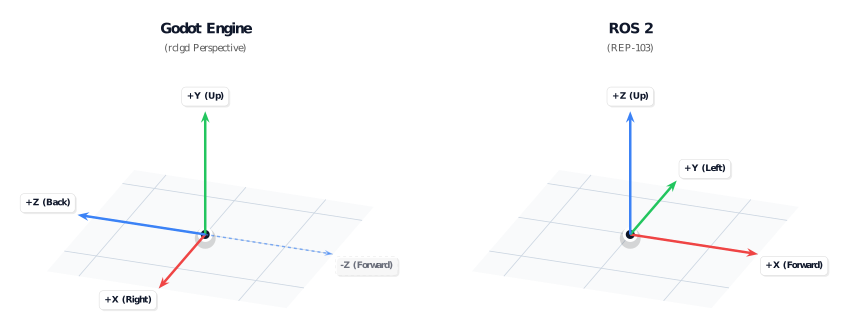
Axis Mapping in rclgd
To ensure absolute compatibility with core ROS 2 navigation packages (like Nav2 and robot_localization), rclgd implements the standard Ground Vehicle Convention.
By negating exactly two components (the ground plane axes), we preserve the Right-Hand Rule globally—ensuring positions, linear velocities, quaternions, and angular forces transfer flawlessly.
Godot Direction |
ROS 2 Direction (REP-103) |
Vector Transformation Mapping |
|---|---|---|
-Z (Forward) |
+X (Forward) |
|
-X (Left) |
+Y (Left) |
|
+Y (Up) |
+Z (Up) |
|
GDScript Examples
Manual Transform Conversion
The exact mapping used internally by the TF broadcaster and listener is exposed on the rclgd singleton as godot_to_ros_vector, ros_to_godot_vector, godot_to_ros_quat and ros_to_godot_quat. Use these helpers whenever you build geometry by hand (poses, twists, odometry), so your data always agrees with what TF publishes:
func godot_to_ros_transform(t: Transform3D) -> RosMsg:
    var msg = RosMsg.from_type("geometry_msgs/msg/Transform")

    # 1. Map Position (Origin)
    var pos = rclgd.godot_to_ros_vector(t.origin)
    msg.translation.x = pos.x
    msg.translation.y = pos.y
    msg.translation.z = pos.z

    # 2. Map Rotation (Quaternion)
    var q = rclgd.godot_to_ros_quat(t.basis.get_quaternion())
    msg.rotation.x = q.x
    msg.rotation.y = q.y
    msg.rotation.z = q.z
    msg.rotation.w = q.w

    return msg
Under the hood the vector helper applies the table above (ros = Vector3(-godot.z, -godot.x, godot.y)), and the quaternion helper shuffles the components the same way, which preserves structural symmetry and eliminates matrix shearing or skewing errors.
Using TF Broadcasters and Listeners
High-level objects like RosTfBroadcaster and RosTfListener abstract these conversions natively under the hood, transforming local scene trees directly into valid ROS 2 /tf configurations. Each broadcaster/listener belongs to the RosNode that created it, so transforms show up in the ROS graph under the node that publishes them.
var broadcaster: RosTfBroadcaster
var listener: RosTfListener

func setup_tf_demo():
    # Instantiate interfaces from your custom ROS node instance
    broadcaster = ros_node.create_tf_broadcaster()
    listener = ros_node.create_tf_listener()

func publish_my_move(t: Transform3D):
    # Broadcasts a local Godot transform instantly converted into the ROS vehicle frame
    # send_transform(transform, frame_id, parent_frame_id, is_static)
    broadcaster.send_transform(t, "base_link", "odom")

func get_robot_position():
    # Looks up a ROS transform and returns a native Godot Transform3D
    # with inverse coordinate mappings applied automatically.
    # Returns null when the transform is not (yet) available.
    var t = listener.lookup_transform("odom", "base_link")
    if t != null:
        print("Robot Position in Godot space: ", t.origin)
        print("Robot Rotation Basis: ", t.basis)
Looking up transforms at the time data was captured
Called with two arguments, lookup_transform returns the newest transform in
the buffer. That is the right answer when you are asking "where is the robot
now", and the wrong one when you are placing data that was captured a moment
ago: a laser scan stamped 80 ms back belongs where the sensor was 80 ms back,
not where it is now. Rendering it against the newest transform makes the world
appear to slide around whenever the robot moves quickly.
Add a third argument and the transform is resolved at that time instead,
interpolating between the surrounding samples. Feed it the header.stamp of
the message you are about to draw:
func _on_scan(msg: RosMsg):
    var t = listener.lookup_transform("map", msg.header.frame_id, msg.header.stamp)
    if t == null:
        push_warning(listener.get_last_error())
        return
    render_scan_at(t, msg)
The time argument accepts null (latest available, the same as leaving it
out), a float of seconds since the epoch, or a RosMsg holding a
builtin_interfaces/msg/Time as above. can_transform takes the same
argument, and answers the same question without doing the work.
How far back you can reach is bounded by the buffer length, which defaults to
10 seconds and is set when the listener is created —
ros_node.create_tf_listener(30.0). Reaching past it fails the same way a
missing frame does: the lookup returns null and get_last_error()
carries TF2's own explanation, which is worth surfacing to the user rather than
swallowing, because it distinguishes "this frame does not exist" from "this
stamp is too old".
Inspecting the frame graph
A listener can also report what it knows about, which is what you need to populate a frame picker or draw the tree:
for frame in listener.get_frame_names():
    var parent := listener.get_frame_parent(frame)   # "" for a tree root
    var age := listener.get_frame_latest_time(frame) # 0.0 if static-only
    print("%s <- %s" % [parent, frame])
all_frames_as_yaml() returns the same dump as
ros2 run tf2_tools view_frames, including each frame's broadcaster and
publish rate, when you want the whole picture at once.