Building turtlesim_rclgd
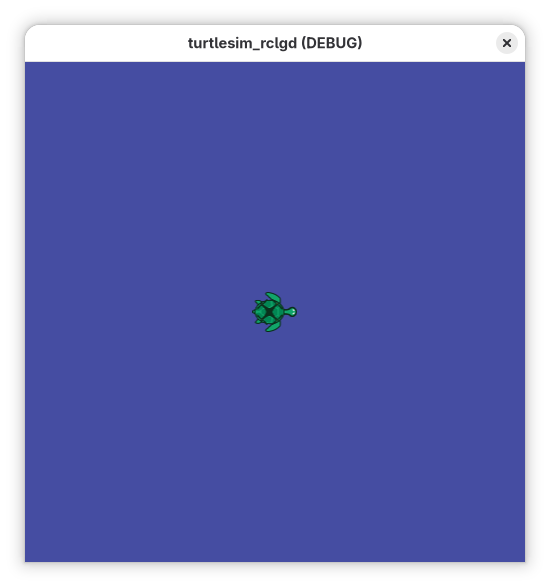
This tutorial showcases how to build a fully-featured ROS 2 Node in Godot 4 using rclgd. We will look at snippets from the turtlesim_rclgd package—a 100% native Godot reimplementation of the classic ros2_tutorials/turtlesim.
Through this example, you will see how to leverage RosNode, Publishers, Subscribers, Services, and Parameters using GDScript.
All code for this example is at turtlesim_rclgd.
1. Initializing the ROS 2 Node
Before you can communicate over the ROS network, the global rclcpp context must be initialized. In our world.gd script (attached to the main Godot scene), we ensure the context is active and spin up a new Node:
extends Node2D

var ros_node: RosNode

func _ready():
    # 1. Initialize the global ROS 2 context if missing
    if not rclgd.ok():
        rclgd.init()

    # 2. Instantiate a new native RosNode
    ros_node = RosNode.new()
    ros_node.init("turtlesim")

    # Now the node is visible on the network as /turtlesim
2. Publishers and Subscribers
Our Turtle node needs to dynamically create topics matching standard ROS 2 message types (like geometry_msgs/msg/Twist).
Subscribing to Velocity (cmd_vel)
We create a subscriber during the turtle's setup. The callback automatically receives a dynamically mapped RosMsg object representing the Twist:
var cmd_vel_sub: RosSubscriber
var linear_vel: float = 0.0
var angular_vel: float = 0.0

func setup(turtle_name: String):
    # Create the Subscriber:
    cmd_vel_sub = ros_node.create_subscription("/" + turtle_name + "/cmd_vel", "geometry_msgs/msg/Twist", _on_cmd_vel)

# Handling the callback data:
func _on_cmd_vel(msg: RosMsg):
    linear_vel = msg.linear.x
    angular_vel = msg.angular.z
Publishing Pose
In our physics loop, we continuously publish our Godot position back to ROS by creating a RosMsg from a type string:
var pose_pub: RosPublisher

func setup(turtle_name: String):
    pose_pub = ros_node.create_publisher("/" + turtle_name + "/pose", "turtlesim/msg/Pose")

func _publish_pose():
    var msg = RosMsg.from_type("turtlesim/msg/Pose")

    # Convert Godot pixel coordinates to standard Turtlesim meters
    msg.x = position.x / 50.0
    msg.y = (500.0 - position.y) / 50.0
    msg.theta = rotation
    msg.linear_velocity = linear_vel
    msg.angular_velocity = angular_vel

    pose_pub.publish(msg)
3. Creating and Using Services
Services handle one-off remote procedural calls (like spawning a new turtle). rclgd handles service callbacks natively.
Hosting a Service Server
In world.gd, we host the /spawn service:
var spawn_srv: RosService

func _ready():
    # ... [node init] ...
    spawn_srv = ros_node.create_service("/spawn", "turtlesim/srv/Spawn", _on_spawn)

# The callback receives a Request and Response RosMsg. Fill the response
# in place — it is sent when the callback returns.
func _on_spawn(req: RosMsg, res: RosMsg):
    var name = req.name
    if name == "":
        name = "turtle" + str(turtles.size() + 1)
    res.name = name  # Modify the response directly

    # Instantiate our Godot scene on the main thread (see the tip below)
    spawn_turtle.call_deferred(name, Vector2(req.x * 50.0, 500.0 - req.y * 50.0), req.theta)
Threading in Callbacks
Tip
Crucial Detail: Behind the scenes, rclgd executes the actual ROS C++ callbacks in a background thread, but marshals topic, timer and action GDScript callbacks back to Godot's main thread using call_deferred — you can safely touch the SceneTree from those. Service server callbacks are the exception: they run synchronously on the executor thread (the response must be filled before returning to the client), so defer any scene mutation with call_deferred.
turtle.gd handles the teleportation service accordingly — the response is
filled in place, while the scene change is deferred to the main thread:
func _on_teleport_absolute(req: RosMsg, _res: RosMsg):
    # Service callback: executor thread! Defer the scene mutation.
    _apply_teleport.call_deferred(Vector2(req.x * 50.0, 500.0 - req.y * 50.0), req.theta)

func _apply_teleport(pos: Vector2, theta: float):
    position = pos
    rotation = theta
4. Handling ROS 2 Parameters
Modern ROS 2 configuring is heavily parameter-driven. We can use rclgd to declare parameters and react to changes (like a user running ros2 param set) using native Godot Signals.
func _ready():
    # ... [node init] ...

    # Declare defaults:
    ros_node.declare_parameter("background_r", 69)
    ros_node.declare_parameter("background_g", 77)
    ros_node.declare_parameter("background_b", 162)

    # Connect the parameter update signal:
    ros_node.parameter_changed.connect(_on_parameter_changed)

# Reading them dynamically to paint our background Node:
func _update_background_color():
    var r = ros_node.get_parameter("background_r")
    var g = ros_node.get_parameter("background_g")
    var b = ros_node.get_parameter("background_b")

    $Background.color = Color8(int(r), int(g), int(b))

func _on_parameter_changed(name: String, value: Variant):
    # Instantly applies the new RGB value to the UI canvas!
    if name.begins_with("background_"):
        _update_background_color()
Conclusion
By mapping rclcpp constructs to GDScript classes (RosNode, RosPublisher, RosService) and dynamic dictionaries (RosMsg), rclgd makes writing native ROS robots and simulators in Godot 4 fluid and powerful!